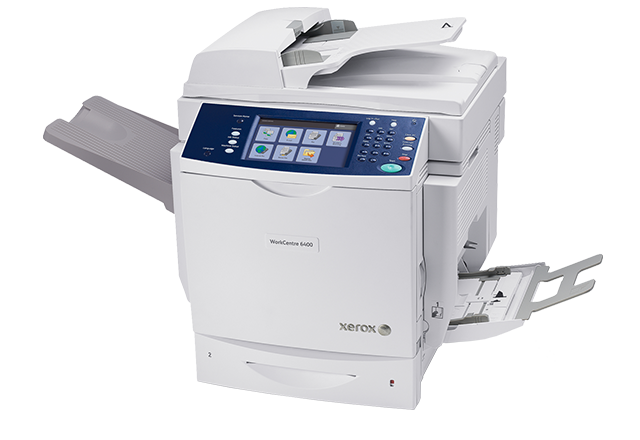
WorkCentre 6400 - Full-featured power in a desktop device

Share this page:

WorkCentre™ 6400 at a glance

Model 6400V/S 6400V/X 6400V/XF
Price £ 3415£ 3685£ 5349
Standard functions Copy, Email, Print, ScanCopy, Email, Print, Scan, Walkup fax with LAN faxCopy, Email, Print, Scan, Walkup fax with LAN fax
Optional functions Network accounting enablementNetwork accounting enablement, Network fax server enablementNetwork accounting enablement, Network fax server enablement
Connectivity 10/100/1000BaseTX Ethernet, IPv6, USB 2.010/100/1000BaseTX Ethernet, IPv6, USB 2.010/100/1000BaseTX Ethernet, IPv6, USB 2.0
Standard paper capacity 600 sheets600 sheets1,600 sheets
Finisher OptionalOptionalStandard
Detailed specifications
Next Steps


Quick Facts - WorkCentre 6400
  • The WorkCentre 6400 starts at £ 3415.
  • Standard functions: print, copy, colour scan, email (and walkup fax with LAN fax on WorkCentre 6400X/XF)
  • Colour: up to 30 ppm
    Black: up to 35 ppm
  • Full colour touch screen
  • Network connectivity standard
  • Maximum paper size: 216 x 356 mm
  • Two-sided output standard
  • Duplex automatic document feeder standard
  • Standard paper capacity: up to 1,600 sheets (6400XF)
  • Finisher with stapling and collating (standard on 6400XF)
  • Scan destinations: email, network folders, hard drive
  • 80 GB hard drive standard
  • Windows (including Vista), Mac, and Novell compatible
  • Xerox Extensible Interface Platform enabled
  • Maximum duty cycle of 120,000 pages per month
  • Recommended average print volume of up to 15,000 pages per month
  • Minimum dimensions of WorkCentre 6400 (w x d x h): 32 x 23.1 x 24.7 in. (812 x 588 x 627 mm)
  • What comes in the box
  • Need 11 x 17" paper capability?
Competitive Edge - WorkCentre 6400
  • A true MFP, unlike most competitive products that are a printer with a scanner on top
  • Print Around feature is not available on competitive products, meaning jobs in their queues can't print if a job is held up. The WorkCentre 6400 will print jobs "around" the one that needs attention.
Power and value - WorkCentre 6400
  • Fast speed of up to 30 ppm colour/up to 35 ppm black can keep up with your office's heavy demands
  • Truly multitask—access walk-up copying, scanning and faxing even while other jobs are printing
  • Print Around automatically skips jobs waiting for additional resources (such as special paper size) and prints the next job in the queue
Easy for users and IT - WorkCentre 6400
  • Colour touch-screen is intuitive with big buttons, and easy instructions and help screens
  • Simplify supplies replacement with pre-loaded toners, an easy-access front door and email alerts when levels are low
  • Automatic two-sided copying, printing and fax receipt reduces paper use
Scan-enabled convenience - WorkCentre 6400
  • A full breadth of scanning and document routing capabilities lets you store scans in public or private folders on the hard drive, send files to a pre-assigned "home" destination, and scan files directly to email addresses or store them on a central server
  • Colour scanning allows you to communicate more effectively by digitally sharing your documents in colour
  • Scan to email addresses easily--LDAP integrates scanning with your network address book
Product Reviews
WorkCentre™ 6400 3.3 5 17 17
Relevant Options for a Patient User Our WorkCentre 6400 has good print quality, yet it takes some doing to get to that point. For a busy office on time constraints, this is most likely not the machine for you. Each process the 6400 provides has relevant importance, yet the steps required to utilize those options mandate constant confirmation that can be cumbersome. Tray 1 of the unit is extremely sensitive to the paper types used and can be frustrating to navigate. We have had periodic service issues, but in relationship to the amount of use, I would say those are overall minimal in volume. For a slower paced office, this may be a great option. 25 October 2011
Works great.... when it works We've had this WorkCentre for 2 years now and it worked fine for the first 2-3 months. Since then, we have had nothing but problems. The Fax feature randomly stops working, randomly the WorkCentre won't accept any jobs because it's "busy" (even though its not running any jobs and its been sitting idle for hours), the feed try for scanning always "jams" or "can't feed" the paper for unkown reasons (everything lines up correctly and it worked for the job before). The print quality is good, the speed is good, but more than 50% of the time the device is unusable for unknown reasons that seem to be software bugs. 25 October 2011
Xerox 6400 Multifunction A Great Office Solution My firm purchased 5 of these units along with a high end Xerox copier and a few higher end Xerox black and white printers and have been very happy with as it has really helped with office efficiency and processing in so many ways. In addition, we have been able to dramatically reduce our toner cost over the last year with these units. Our office has also enjoyed the we now all share the same interface no matter which Xerox machine we go to saving a lot of time and support cost. From its advanced networking to fast operating speeds at up to 32 ppm color and 37 ppm black-and white, the WorkCentre 6400/SFS Multifunction Printer is tailor-made for medium to large size workgroups. You can access walk-up copying, faxing and scanning functions when you need them, even while other jobs are printing. Spend your valuable time working, not waiting for your turn. The Print Around feature detects print jobs waiting for additional resources (such as a special paper size) and prints the next print job in the queue. The WorkCentre 6400/SFS gives your business crucial tools in an easy-to-use package. Walk-up use is intuitive thanks to the iconbased, 8-inch color touch screen with help screens. Toner replacement is simple thanks to the easy-access front door and menu screen makes it quick to check levels of both toner and waste cartridge life. Automatic two-sided copying, printing and fax receipt reduces office paper use, and its 600-sheet input capacity saves even more time with large print jobs. You can even set limits to users’ access to functionality and control access to color by generating usage reports for analysis and billing purposes. The WorkCentre 6400/SFS comes with the MFPlus scanning solution. It helps businesses easily integrate scanning and electronic document management into their existing workflows. MFPlus is built for future industry standards including electronic filing and sharing. 22 October 2011
This product is made well with high quality and features. The WorkCentre 6400 does every task I ask with ease and continues to impress me with the excellent color printouts. I print manuals, with hundreds of pages, and can upload the job to the printer for repeating. These printouts typically have no errors. This is simply the best mufti-function printer I have ever owned. 20 October 2011
An expensive headache When our organization first purchased this unit, it was broken. After a lengthy return process, we received our second unit that worked for three weeks before it started jamming and smearing print and copy jobs. This machine has been nothing but a pain. When it did work, the print and copy quality was acceptable, but the user interface was not "user friendly." The touchscreen was overly sensitive and frustrated the staff to where they would not use the unit at all. I was satisfied with the Xerox support team (very friendly and knowledgeable about the product),but I was not happy with the options that they had offered. With the labor and parts cost, we may as well buy a new unit--which we will not do. Xerox has lost our business. I hope we are the isolated incident, but this is a warning to all who consider buying this product. 12 August 2011
Constant paper jams We had this for about 2 months and have yet to complete one job without this copier jamming up. I tried different drawers and it still doesn't matter. 19 July 2011
good product for the price Bought this unit for the high speed scanning. Was not very easy to setup and required an outside specialist. After the setup was completed I am very happy, I scan over 100 pages daily. Copy quality is great and color prints are sharp. There is an ongoing issue with the toner cartridge contacts, but is covered by warranty and techs are quick to come. This aside I would still recommend this for purchase. 17 March 2011
WorkCentre 6400 - Best Printer I Ever Had The WorkCentrre 6400 is the best printer I have ever owned. It's ease of use, speed and quality have shown me why Xerox is such a respected company. The colors are crisp and beautiful. The scan speed is unsurpassed. The copying functions work flawlessly. I work at a printing company whereby quality is appreciated. I now have a whole building printing to my printer (yes...I bought this for my personal needs). I always wanted the "best of the best" and I now have one. This printer will last me a long time as it's features are outstanding. Every try to print on heavy bond? No problem with the manual feed. Brochures, graphics and CAD drawings look superior from this printer. Once in a while I get to purchase a very good piece of equipment. This is one of those times. 16 March 2011
23next>>


  See product overview
Software Solutions - WorkCentre 6400
Digitize . . . Organize . . . Distribute . . . Collaborate

With digital documents, you can easily create, search, re-use, and build upon your documents. Maximize your hardware investments with innovative software solutions from Xerox and Xerox Business Partners:
  • Contain costs
  • Share knowledge
  • Accelerate workflow
  • Integrate paper and electronic documents
  • Manage and distribute documents effectively
 Show me the Software Solutions

Pricing Details

*Prices do not include any supplies, additional print charges or applicable taxes and are subject to change without notice. Products are available to business customers; subject to applicable terms and conditions. Xerox equipment and accessories have been produced in a factory from new parts and from reprocessed parts which meet the performance standards of new parts.

1 Average standard pages. Declared Yield in accordance with ISO/IEC 19798. Yield will vary based on image, area coverage and print mode.

2 Approximate pages. Declared Yield on Drums based on an average job size of 5 pages A4/letter size. Declared Yield on Fusers based on A4/letter size 20 lb (75 gsm) pages. Drum and Fuser Yields will vary based on job run length, media type, size, weight, orientation, and usage patterns.